
TL;DR:
- True collaborative 3D design transforms the design process by enabling real-time collaboration on a single data source, without duplication or errors. It requires centralisation, automated version management, and the right organisational culture to ensure successful implementation. Gradual adoption, training, and change management are essential to fully benefit from this approach.
Sharing a STEP file by email—is that still collaborative 3D CAD? No. Yet many industrial SMEs still confuse this file-transfer reflex with a genuine collaborative approach. The reality is very different: collaborative 3D design transforms the very logic of design by enabling multiple teams to work simultaneously on the same data source, with no loss of information or duplicate versions. Understanding what this concept truly covers is the first condition for gaining a tangible competitive advantage and accelerating your time to market.
Table of contents
- What does collaborative 3D design mean in industrial product development?
- The key components of collaborative 3D design
- Challenges of a universal definition and practical limitations
- Implementing collaborative 3D design: first steps and best practices
- Why the true value of collaborative 3D design depends less on technology than on company culture
- Implement collaborative 3D design with Ohmycad and its partners
- Frequently asked questions about collaborative 3D design
Key Points
| Point | Details |
|---|---|
| A living definition | Collaborative 3D design adapts to business needs and evolves with industrial use cases. |
| Unified platforms | Working in real time on a single source of information eliminates version errors and silos. |
| Business value | Gains in productivity, traceability, and innovation are within reach even for smaller organisations. |
| People first | The success of collaborative 3D design depends first and foremost on your teams’ buy-in, not just the technology. |
| A gradual approach | Deploying collaborative 3D design requires a pilot, training, and an adapted documentation structure. |
What does collaborative 3D design mean in industrial product development?
Many teams still think that collaborating in CAD means “sending the file to a colleague”. This view reduces collaboration to a simple transfer mechanism, whereas it is in fact a profound change in how design is organised.
Collaborative 3D CAD refers to a set of software and methods that make it possible to create, modify, analyse, and optimise digital models while facilitating collaboration among all project stakeholders. It is not simply another modelling tool: it is a structured working framework in which data is centralised and accessible in real time to all relevant parties—designers, engineers, buyers, or customers.
The difference from traditional CAD is fundamental. In a conventional environment, each designer works locally on their workstation, with files they save, name, and share manually. The result is a proliferation of versions, errors introduced during exchanges, and longer validation lead times. With a collaborative approach, everyone works from the same single source of truth, hosted on a centralised platform.
The benefits of modern CAD are directly measurable for SMEs:
- Reduced version errors: no more “vFINAL2_ok_approved_FINAL.sldprt” files circulating by email
- Elimination of information silos: the design office and purchasing read the same part, at the same stage
- Faster validation cycles: feedback is integrated directly into the model with no transcription delay
- Full traceability: every change is time-stamped and attributed to its author
“Collaborative CAD makes it possible to create, visualise, simulate, and optimise 3D models and streamline development, while integrating collaboration tools.” This wording captures precisely what collaborative 3D brings beyond simple modelling.
Pro tip: Be careful not to confuse “shared CAD” (sending files between colleagues) with true, structured digital collaboration. The difference lies in data centralisation and real-time synchronisation, not simply in working with multiple people.
Now that we have positioned the concept, let us look at how collaborative 3D design is implemented in practice within platforms.
The key components of collaborative 3D design
When we talk about collaborative 3D design in industry, several technical and organisational pillars come into play. Understanding these components helps you assess what is missing in your current environment and what a platform like 3DEXPERIENCE can provide.
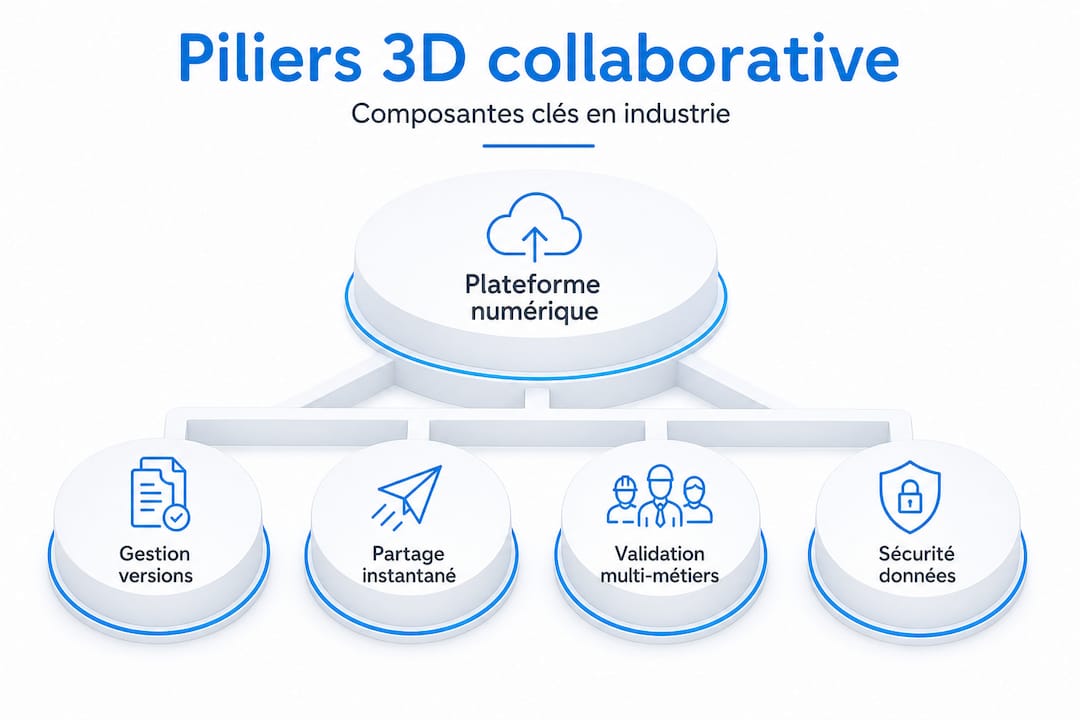
According to Dassault Systèmes, collaboration in industrial CAD refers to the use of digital platforms and workflows that unify design and enable real-time collaboration between departments. This definition points to four key components.
| Component | Traditional local CAD | Collaborative 3D CAD |
|---|---|---|
| Version management | Manual, via file naming | Automatic, time-stamped, and centralised |
| Data access | Limited to the workstation or local network | Multi-user, real time |
| Change tracking | Non-existent or documented separately | Built into the platform |
| Simulation and validation | Separate tool, export required | Integrated in the same environment |
| Project documentation | External Word/Excel files | Linked directly to 3D objects |
A typical collaborative workflow in an industrial SME is structured as follows:
- Project initiation: create a shared workspace on the platform, assigning roles and access rights.
- Iterative design: designers modify parts or assemblies directly in the shared environment, with component locking while edits are in progress.
- Review and comments: stakeholders (engineers, project managers, customers) annotate directly on the 3D model, with no format conversion.
- Integrated validation: simulations (structural, thermal, fluid) are launched from the same space, and results are attached to the model.
- Documentation updates: bills of materials, drawings, and datasheets update automatically based on the validated model.
- Archiving and traceability: each validated version is archived with its metadata to ensure regulatory compliance.
3DEXPERIENCE use cases in the automotive industry illustrate this cycle well: fewer physical iterations, faster virtual validation, and better coordination between geographically dispersed design offices. For SMEs getting started, good CAD file organisation remains the essential foundation even before moving to a collaborative environment.
With these fundamentals in mind, it is essential to explore the challenges that 3D collaboration raises in real industrial settings.
Challenges of a universal definition and practical limitations
Here is a point that few articles address frankly: there is no universal, stable definition of collaborative 3D. Each industrial sector, each software vendor, and even each academic proposes its own interpretation of the term.
Specialist literature clearly identifies this issue: the absence of a unified framework and the need for standardised evaluation metrics still characterise the field of collaborative CAD today. This is not a minor flaw—it is a reality with practical consequences for SMEs.
| Criterion | Academic definition | Software vendor view | On-the-ground reality for SMEs |
|---|---|---|---|
| Scope | Co-design process | Platform features | Enhanced file sharing |
| Indicators | Shared efficiency metrics | Adoption rate, uptime | Perceived time savings |
| Stakeholders | Multi-level stakeholders | Licensed users | Design office + project manager |
| Timeframe | Entire product lifecycle | Subscription period | Design phase only |
This table reveals a significant gap: what you read in a specification or a commercial proposal does not necessarily match what your teams call “collaborating”. Collaborative 3D visualisation, for example, is often presented as a component of collaboration, but it represents only one aspect of the overall approach.
“Academic literature highlights concrete challenges in collaborative CAD: the absence of a unified framework and the need for standardised evaluation metrics. There is not always a clear consensus on what ‘collaborating’ in CAD means.”
In the face of this fragmentation, what stance should you take? Focus on your own internal challenges rather than seeking a perfect definition. The CAD innovations to adopt in 2026 are moving towards pragmatic approaches: identify a specific problem (repeated version errors, validation lead times that are too long, a silo between the design office and production) and choose tools based on that problem.
Pro tip: Do not waste time looking for “the best definition” of collaborative 3D. Instead, identify the most costly bottleneck in your current design process. That is the point your collaborative approach must address first.
It is also important to manage your expectations around integration. A collaborative platform does not solve communication problems between departments. It provides tools to communicate better, but adoption requires time, training, and a willingness to change habits.
To go beyond the concept, discover how to implement a collaborative 3D approach in your SME.
Implementing collaborative 3D design: first steps and best practices
Moving to collaborative 3D design is not decided in a single meeting. It is built progressively, with method. Here is how to approach this transition without getting lost in complexity.
Basic steps to start a collaborative project:
- Audit the current situation: map your current workflows and identify friction points (duplicates, delays, frequent errors).
- Define the pilot scope: choose a specific project or sub-assembly to test the collaborative environment without jeopardising production.
- Select the platform: evaluate solutions based on your current ecosystem (existing CAD tools, ERP, file formats).
- Train the teams: plan sessions tailored to different profiles—not only designers, but also approvers and project managers.
- Gradual rollout: start with version management, then review functions, then simulation, rather than enabling everything at once.
- Measure and adjust: define simple indicators (number of versions issued per project, average validation time) to measure real impact.
The 3DEXPERIENCE platform unifies design and development by enabling real-time collaboration between departments. For SMEs getting started, this modular approach is particularly well suited: features are activated as team maturity increases.
Best practices to adopt from the outset:
- Involve non-CAD functions (purchasing, quality, production) from the pilot phase to reduce resistance
- Establish a clear CAD documentation method before moving to the collaborative environment
- Define naming conventions and locking rules for shared components
- Appoint an internal platform champion trained to support colleagues day to day
The most common risks to anticipate are often underestimated. First pitfall: the learning curve. Even with modern, user-friendly interfaces, teams need two to four weeks before they are truly comfortable. Second pitfall: neglecting documentation structure. If your starting data is poorly structured, the collaborative platform will amplify the disorder rather than reduce it.
Practical applications such as AR/3D collaboration tools show that the future of collaborative work also includes augmented reality for design reviews directly on the shop floor—a trend that innovative SMEs are beginning to explore. To structure your working habits now, explore the CAD workflows that support this type of transition.
Pro tip: Start with a targeted pilot use case—ideally a medium-sized project with two or three key contributors. A well-run pilot is more convincing than a long theoretical demonstration.
After reviewing the practical aspects, it is useful to step back and challenge certain professional reflexes.
Why the true value of collaborative 3D design depends less on technology than on company culture
Here is a reality we regularly observe with our clients: SMEs that fail in their collaborative transition did not choose the wrong tool—they underestimated the cultural work required.
The temptation is strong to wait for the “perfect tool” before getting started. But that tool does not exist. What does exist are well-trained teams and strong communication habits that know how to make the most of even an imperfect tool. Conversely, a perfectly configured platform solves nothing if teams continue to operate in silos.
Those who succeed in mastering 3DEXPERIENCE and leveraging 3D collaboration share one thing in common: they invested as much in change management as in technology. That means workshops to co-build new practices, regular project review rituals, and leadership that publicly values collaborative behaviours.
Breaking down silos is first and foremost a human challenge. An engineer who has never shared their in-progress models will not do so spontaneously just because a new platform has been installed. They will do it because they understand that this transparency prevents costly corrections later on.
“Technology is only a support. Collaborative momentum is learned and cultivated in the field.”
Reinvesting in project communication, weekly cross-functional reviews, and shared documentation often helps an SME progress far faster than changing tools. Technology follows culture, not the other way around.
Implement collaborative 3D design with Ohmycad and its partners
You now understand the challenges, components, and best practices of collaborative 3D design. The next step is to find the tools and support that truly match your context.
At Ohmycad, we support industrial SMEs and startups in selecting and implementing collaborative 3D solutions tailored to their size and processes. Whether you want to discover the 3DEXPERIENCE platform as a whole, explore the possibilities of collaborative 3D modelling with CST Studio Suite, or better understand the types of collaborative 3D visualisation available, our team is here to guide you. Contact our experts for a free assessment or to launch a collaborative pilot project under the best conditions.
Frequently asked questions about collaborative 3D design
Is collaborative 3D design reserved for large companies?
No. It is now accessible to SMEs thanks to modular, flexible cloud solutions. Modern collaborative tools help streamline development regardless of company size.
What are the immediate benefits of collaborative 3D CAD?
You improve data reliability, reduce version errors, and streamline cross-functional validation. Real-time collaboration eliminates silos and unifies design from the very first weeks of use.
Which tools facilitate collaborative 3D for industry?
Platforms such as 3DEXPERIENCE or CATIA integrate all key functions: real-time management, sharing, and editing. The 3DEXPERIENCE platform is particularly well suited to the multi-disciplinary environments of industrial SMEs.
Can you continue using your legacy files in a collaborative environment?
Yes. Most platforms include import functions and advanced compatibility features to reuse existing data without starting from scratch.




