

TL;DR:
- Rigorous organization of 3D projects avoids unforeseen costs and delays by preparing tools, files, and processes from the outset.
- Effective management relies on clear planning, rigorous version tracking, and continuous documentation throughout production.
Poorly organizing a 3D modeling project is costly: untraceable files, version conflicts, blown deadlines, deliverables rejected by the client. These situations are not bad luck. They almost always result from insufficient preparation. This 3D project organization guide offers a structured approach, from setting up tools to final delivery, including production monitoring methods. Whether you are a CAD student or a seasoned professional, you will find concrete benchmarks here to start on the right foot and maintain consistent quality throughout the project.
Table of contents
- Key points
- Tools and Prerequisites for a 3D Project
- Planning and Launching the Modeling Project
- Managing and Monitoring 3D Production
- Validation, Documentation, and Final Delivery
- What I Learned from Seeing Well-Organized and Poorly Organized Projects
- Ohmycad Supports You in Your 3D Projects
- FAQ
Key points
| Point | Details |
|---|---|
| Prepare tools before starting | Choosing software and naming conventions from the outset avoids costly reorganizations during the project. |
| Structure the pipeline into three phases | Pre-production, production, and post-production form a solid framework for maintaining quality and efficiency. |
| Track versions from the first file | Integrating Git LFS or a PDM from the start protects against data loss and conflicts. |
| Document every key decision | Regular and standardized documentation ensures traceability and facilitates post-delivery maintenance. |
| Collaborate via cloud platforms | Centralized collaborative tools reduce coordination errors and accelerate revisions. |
Tools and Prerequisites for a 3D Project
Before modeling the first part or scene, you must lay solid foundations. Teams that neglect this step spend hours searching for files, reconciling conflicting versions, or reformatting incompatible data. It’s not a matter of talent. It’s a matter of organization.
Software Adapted to Your Context
The choice of tools depends on the industry and team size. Here is an overview of the most used solutions in 2026:
| Category | Tool | Primary Use |
|---|---|---|
| CAD Modeling | SOLIDWORKS, CATIA | Mechanical design, industrial assemblies |
| Collaborative Platform | 3DEXPERIENCE | Data management, cloud collaboration, PLM |
| Version Control | Git LFS, PDM | Versioning of large binary files |
| BIM & Coordination | IFC, BCF | Construction projects, interdisciplinary coordination |
| Project Tracking | Notion, Jira, MS Project | Planning, task assignment, reporting |
For mechanical design projects, industrial 3D modeling methods effectively guide the choice of modeling strategies according to production constraints.
File Organization from the Start
Adopt a unique naming convention before opening the first software. A proven example: “[Project][Discipline][Component]_[Version]”. This structure makes searches quick and avoids duplicates.

Managing large files requires special attention. Git LFS must be used from the repository’s creation to prevent versioning tools from being saturated with binary files like 3D models. Not integrating it from the start necessitates a painful migration during the project.
Pro tip: Create a README file at the root of each project listing the naming convention, software used, and module owners. Anyone joining the project will be operational in less than 30 minutes.
Define Roles and Schedule
Every team member must know exactly what they are modeling, by when, and according to what standards. A RACI (Responsible, Accountable, Consulted, Informed) matrix formalized at the beginning of the project avoids gray areas. Combine it with a production calendar with clear milestones for each phase.
Planning and Launching the Modeling Project
Planning is the step that rushed teams too often reduce. This is a mistake. Most failures come from poor planning: every artist or engineer must know exactly what to do and when to do it.
Drafting the Specifications
The specifications define expectations for both the client and the team. They must specify: the expected delivery formats (STEP, IFC, FBX, STL…), the required level of detail (LOD 200, LOD 400 in BIM for example), performance constraints (file size, software compatibility), and validation criteria.
Structuring the Production Pipeline
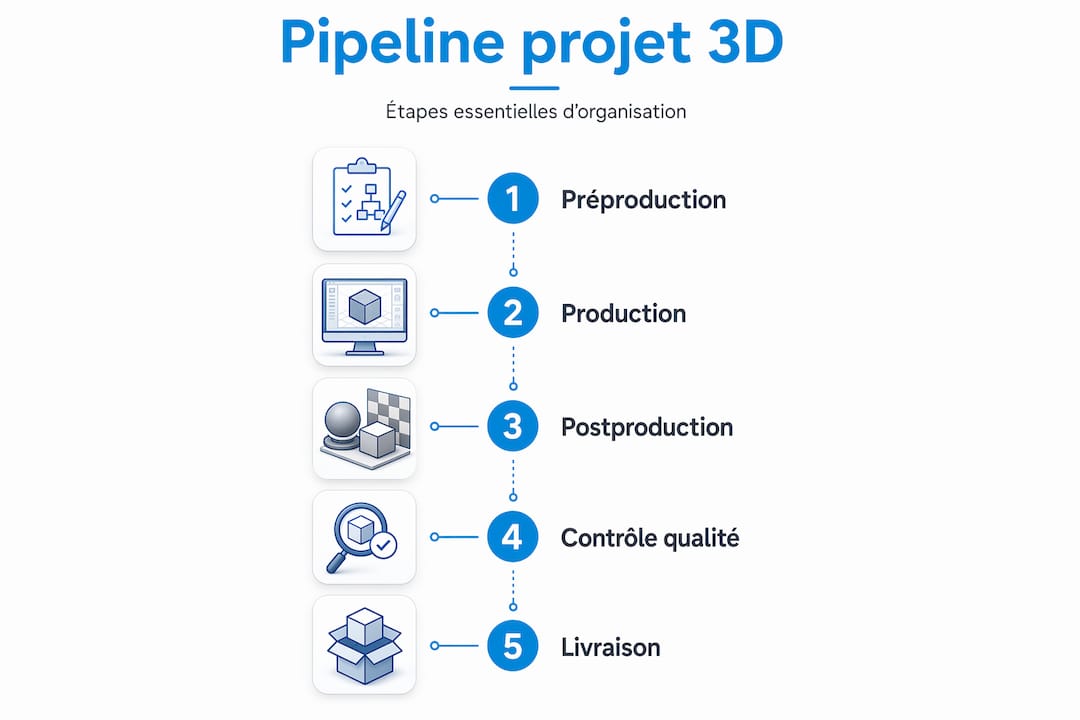
A standard 3D pipeline is divided into three phases: pre-production, production, and post-production. These phases apply equally to animation, industrial design, or architectural modeling.
- Pre-production: definition of requirements, creation of templates, establishment of conventions, concept validation with the client.
- Production: modeling, assembly, simulation, iterations based on internal feedback.
- Post-production: final validation, export to required formats, documentation, archiving.
This breakdown is not just organizational. It allows for precise identification of when a problem appeared, which facilitates correction and billing for out-of-scope modifications.
Standard Formats and Interoperability
For BIM projects, avoid monolithic IFC files. Structuring BIM data into distinct IFC modules by discipline (structure, MEP, architecture) improves collaboration and avoids version conflicts in complex projects. The BCF format complements this approach for annotations and clarification requests between teams.
Pro tip: Schedule a kick-off session of a maximum of 2 hours with all stakeholders to validate the specifications, exchange formats, and schedule. This single meeting avoids dozens of uncoordinated email exchanges later on.
Managing and Monitoring 3D Production
Once production has started, the main risk is silent drift: deadlines slip, modifications accumulate without traceability, and versions multiply. Good monitoring is organized around three axes: regular reviews, change management, and quality control.
Design Reviews and Conflict Detection
Schedule weekly or bi-weekly design reviews. These serve to identify geometric conflicts (clash detection), deviations from specifications, and dependencies between components. In BIM projects, the BCF format via REST API and cloud servers allows for real-time management of issues and their history, directly within the modeling environment.
Version Tracking and Quality Control
A centralized version tracking table centralizes critical information. Here is a simplified model:
| Tracked Item | Recommended Method | Frequency |
|---|---|---|
| File Versions | PDM / Git LFS | With each validated modification |
| Deliverable Status | Kanban Board (Jira, Notion) | Continuous |
| Compliance with Specs | Validation Checklist | By milestones |
| Geometric Conflicts | Automated Clash Detection | Weekly |
| Costs and Deadlines | 4D/5D BIM Integration | By phase |
The digital model enriched in 4D (time) and 5D (costs) allows for visualizing budgetary impacts before work, which reduces errors and costly rework.
Pro tip: Set up a communication channel dedicated to change requests. Any modification outside the specifications must go through this channel with formal validation. This protects your team and automatically documents project evolutions.
Communication and Collaborative Platforms
The most effective 3D project organization tools in 2026 centralize models, comments, and history in a single space. Dassault Systèmes’ 3DEXPERIENCE platform precisely meets this need for teams working with SOLIDWORKS or CATIA. The enriched 3D model becomes a consolidated data repository that facilitates decision-making and collective coordination, far beyond a simple visual.
For advanced design projects, practical advice for optimizing industrial 3D design helps identify common friction points in production workflows and address them before they slow down the team.
Validation, Documentation, and Final Delivery
The delivery phase often concentrates more pressure than production itself. However, it can be managed calmly if the previous steps have been well maintained.
Here are the best practices to apply systematically:
- Milestone Validation: do not wait until the end of the project for validation. Each milestone (end of pre-production, end of production) is subject to formal validation with the client or project manager.
- Documentation Standardization: each deliverable is accompanied by a technical sheet specifying the software used, the file version, exported formats, and usage constraints.
- Structured Archiving: create an immutable final archive at the time of delivery. Versioning the archive with a delivery number (e.g.,
v1.0_livraison_client) ensures traceability in case of dispute or subsequent reuse. - Post-delivery Preparation: document simulation parameters, assembly configurations, and design rules used. This documentation allows another team to resume or extend the work without starting from scratch.
- Deliverable Exploitation: provide a user guide for the delivered files, especially if the client does not have the same software. Neutral formats (STEP, 3D PDF, IFC) ensure data accessibility beyond the project.
Properly documenting a CAD project using a step-by-step method is one of the least taught skills in training and one of the most valued in business. Do not neglect it.
What I Learned from Seeing Well-Organized and Poorly Organized Projects
I have observed 3D projects of all sizes, from mechanical assemblies of a few parts to BIM models involving a dozen disciplines simultaneously. What makes the difference between those that finish on time and those that go off track is rarely technical skill. It’s organization.
The most frequent mistake I see: teams skip pre-production to “save time.” The result? They spend 30% of production time correcting inconsistent naming conventions, resolving file conflicts, and answering questions that the specifications should have settled from the start.
What I also noticed: teams that document continuously, even briefly, deliver projects that clients truly adopt and utilize. Those who document frantically two days before delivery produce archives that no one ever reopens.
My most concrete advice: treat project management as a discipline in its own right, just like modeling. Train yourself in collaborative tools, learn to write specifications, and take the time to structure your files before opening your software. Clear organization is the best guarantee against costly delays and errors in 3D project management. This is not an opinion. This is what the field consistently confirms.
The next step for many teams will be to integrate unified cloud platforms that centralize models, data, and communication. The transition to an intelligent 3D model is already a key lever for the most successful projects. This movement will accelerate.
— Victor
Ohmycad Supports You in Your 3D Projects
Organizing a 3D project rigorously requires the right tools, but also the right resources to quickly build competence.
Ohmycad provides practical guides and solutions adapted for CAD professionals and students. To structure your files and design data, our guide on CAD file organization offers a directly applicable method. To go further in collaboration and centralized management, discover how the 3DEXPERIENCE cloud platform transforms team coordination on complex modeling projects. Our team is available to help you choose the solution best suited to your context.
FAQ
What is a 3D pipeline and why is it important?
A 3D pipeline is the organized sequence of production phases: pre-production, production, and post-production. It ensures that every team member knows what to do and when, which reduces errors and delays.
What tools should be used to manage 3D file versions?
For large binary files, Git LFS is the reference solution. In an industrial CAD context, a PDM (Product Data Management) integrated with SOLIDWORKS or the 3DEXPERIENCE platform ensures reliable and centralized version tracking.
How to avoid conflicts between disciplines in a BIM project?
Structure your IFC files by discipline (architecture, structure, MEP) rather than working with a monolithic file. Use the BCF format to track issues and their resolutions in a shared collaborative environment.
What is the best way to document a 3D project?
Document continuously, not at the end of the project. Each deliverable must be accompanied by a technical sheet specifying the software, version, and exported formats. Structured archiving with versioning ensures long-term traceability.
How to start organizing a 3D project effectively?
Start by defining a naming convention, choosing your software tools, and drafting specifications before modeling. A kick-off session with all stakeholders lays the groundwork for effective coordination from day one.




