
To change the language in 3DEXPERIENCE applications such as CATIA, SIMULIA, CATIA Electrical, … Follow these instructions :
- Launch application
- Click on your initials at top right
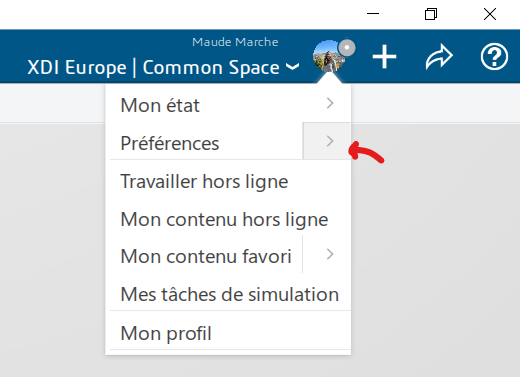
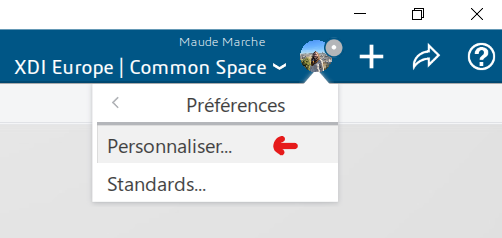
- Click on the arrow next to “Preferences” > Customize
- In the “Options” tab > “User interface language
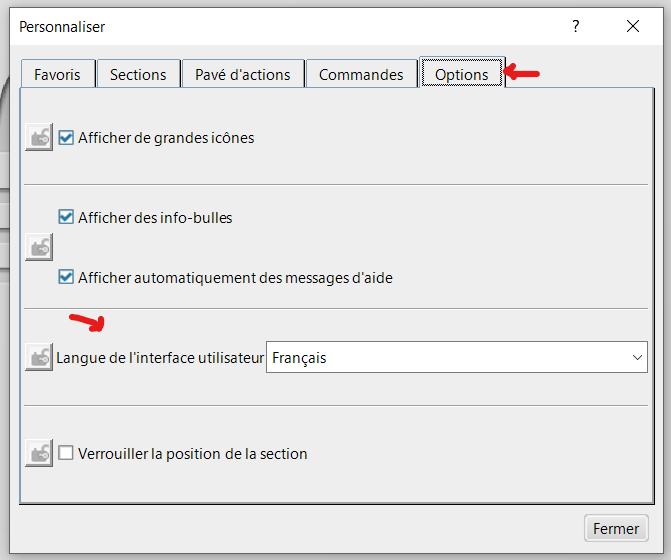
- Select language
post tags :
solidworks online
Solidworks 3DEXPERIENCE
Solidworks for startups
industrial startup
SOLIDWORKS 2026 pricing
industrial
startup
associative
solidworks legal
solidworks hacking
free licenses
subscriber
lium
solidworks
incubator
drafter
cloud
technical support
catia
CATIA V5
heavy-duty assemblies
solidworks design 2026
Solidworks cloud




