
Introduction
Need to access library parts regularly for your designs? In this article we’ll look at how to bookmark our SOLIDWORKS design library directly from the application. Items saved in this way in the platform can be used by all users of your platform.
In SolidWorks
1. Click on the“Design library” tab .
.
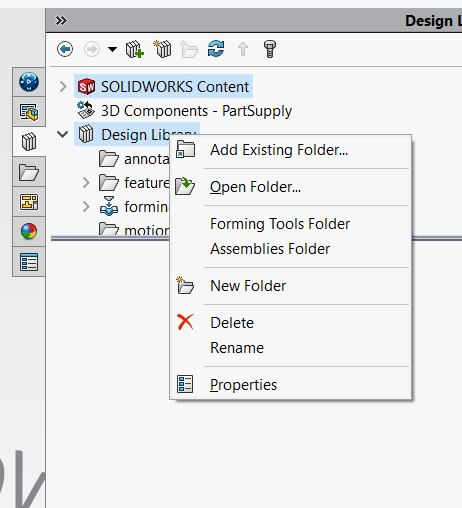
2. Right-click on“Design library“ .
.
3. Select“Add an existing folder “(or Add Existing Folder).
The window below will appear:
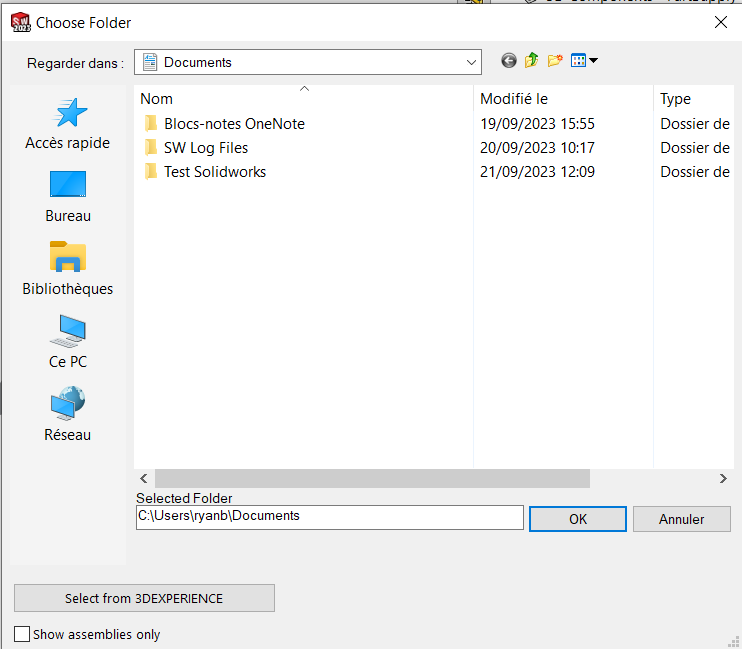
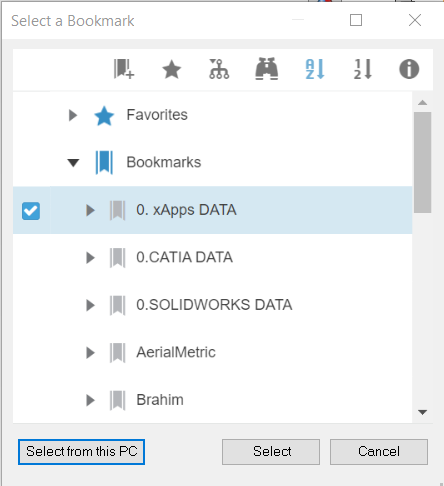
4. Click on“Select from 3DEXPERIENCE“.
5. Finally, you can select the bookmark of your choice and click on“Select from this PC” to add it to your directory.
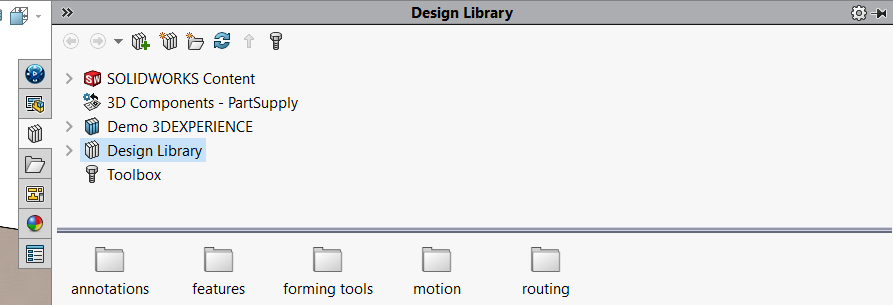
After selecting the “Demo 3DEXPERIENCE” bookmark, for example, we can find it in our Design Library (see below).
post tags :
solidworks online
Solidworks 3DEXPERIENCE
Solidworks for startups
industrial startup
SOLIDWORKS 2026 pricing
industrial
startup
associative
solidworks legal
solidworks hacking
free licenses
subscriber
lium
solidworks
incubator
drafter
cloud
technical support
catia
CATIA V5
heavy-duty assemblies
solidworks design 2026
Solidworks cloud




