
Introduction
When you have a large assembly, exporting your files becomes a time-consuming and repetitive task.
The task scheduler is a time-saving tool that lets you plan the conversion of files stored on your PC.
You can also use the planner to convert files stored on 3DEXPERIENCE, although the method is slightly different. To convert with 3DEXPERIENCE, follow this article instead.
How do you plan your file conversion?
1. Access the Task Scheduler
- Open SOLIDWORKS :
- Click on Tool > SOLIDWORKS Applications > SOLIDWORKS Task Scheduler
2. Schedule a task
- Choose “Export files” from the left-hand menu
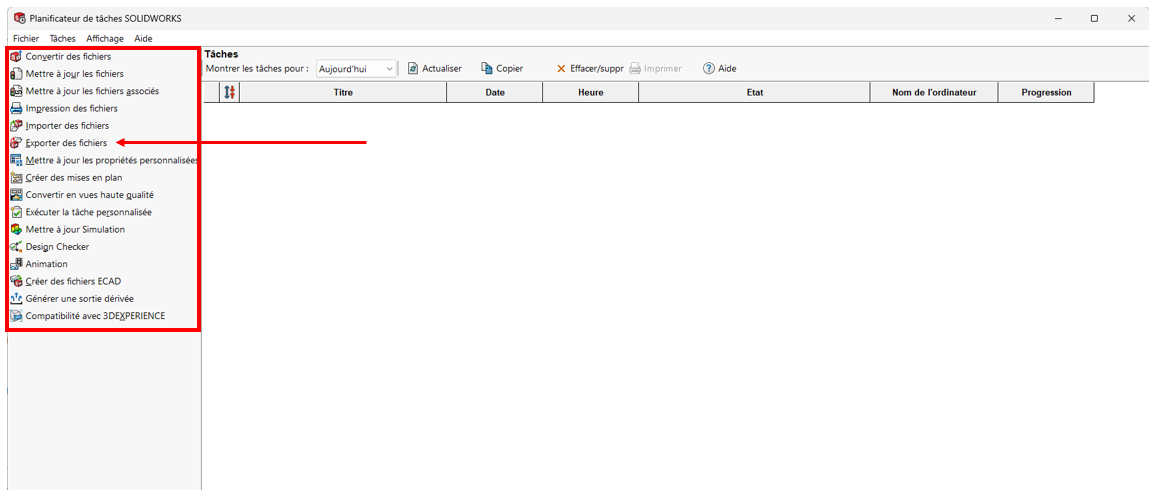
In the window that opens :
- Indicate the desired format for the export file type
- Choose the location of the folder containing your parts to be converted by clicking on “Add folder”, and include sub-folders if required.
- In the “File name or type” box, select the type of format to be converted: .prt/.sldprt part, .asm/.sldasm assembly or drw/slddrw drawing.
- Optional: enter the time you want the task to run in “Task scheduling”.
Tip: You can schedule this task during your off-peak hours.
- Choose the location of the converted files in “Job output folder”, you can select the same folder as the original or specify another location

Warning: if you receive the warning message “The required files are not in the folder”, check that the file type indicated corresponds to the extension of the files to be converted.
- Click on “Finish
- A line corresponding to the created task appears in the task scheduler
3. Manage your tasks
In the task planner, you can view all your tasks and filter them by date.
To see their status, remember to refresh your browser.

4. Your files have been created and are located where you specified!
All you have to do is send them to your customer/subcontractor. So, how much time do you think we’ve saved you with this tool?
Conclusion
The Task Scheduler helps you become more efficient by doing simple, repetitive tasks like file conversion for you.
This tool can also be used to plan many other tasks, such as updating drawings, converting SOLIDWORKS files from previous versions and printing drawings. Dedicated articles on these subjects are planned in the near future.
Need help? We’d love to! Send us an e-mail to
support@xdinnovation.eu




