Who said getting a SOLIDWORKS license was complicated and out of reach?
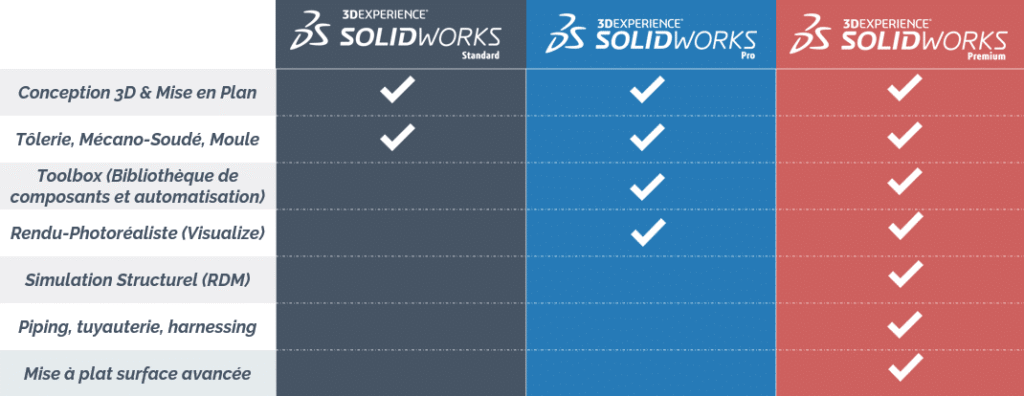
SOLIDWORKS Standard:This version includes essential basic CAD features as well as sheet metal and fabrication tools, along with a product data management (PDM) system. SOLIDWORKS Standard is ideal for startups that need basic design capabilities.
SOLIDWORKS Professional SOLIDWORKS Professional offers all the features of SOLIDWORKS Standard. But it also includes advanced tools such as photorealistic rendering, the Toolbox library, and 3D scan conversion (ScanTo3D), along with PDM. This version is ideal for companies looking to improve their design processes.
SOLIDWORKS Premium: The Premium version of SOLIDWORKS is the most comprehensive, offering features such as linear static simulation, electrical routing, and hydraulic piping, along with PDM. SOLIDWORKS Premium is recommended for engineering professionals and large companies working on complex projects.
SOLIDWORKS connected licenses
All licenses offered by Ohmycadare someconnected licensescloud, offering flexibility and accessibility for users. So, this means you can accessSOLIDWORKSfrom any device with an Internet connection, allowing you to work wherever you are and at any time.
To discover the SOLIDWORKS price click here.
If you have any questions about different versions of SOLIDWORKS or if you'd like personalized advice, feel free to Contact Ohmycad. We can guide you in choosing the version that best suits you.
Step 2: Contact Ohmycad
A great way to obtain your SOLIDWORKS Connected license is to go through an authorized reseller such asOhmycad.
As a trusted partner of SOLIDWORKS, Ohmycad not only offers licenses, but also personalized advice and support to help you get the most out of your software. In addition, u CSM team An expert can guide you through the process and answer all your questions.
Step 3: Explore the Ohmycad startup program
If you are a young company or a startup, Ohmycad offers a special program to help you get started.
The program startup offers affordable access to SOLIDWORKS' cutting-edge tools, allowing you to create innovative products from the ground up.
With Ohmycad as your partner, you can bring your ideas to life and complete your projects without worrying about high licensing costs.
SOLIDWORKS Subscription or Investment with Ohmycad
Step 1: Choose your subscription or investment plan
Ohmycad offers flexible subscription plansto meet your business needs. So, whether you run a small business or a large enterprise, we have an option suited to your use ofSOLIDWORKS. Choose from ourQuarterly or annual subscriptions with no commitment, for maximum flexibility.
But that's not all… You can also choose to go through ourInvestment + Maintenance Package! In the long run, this provides you with a sustainable and cost-effective solution for your business. By making this choice, you’re investing in your future by ensuring continuous access to the latest versions and features of SOLIDWORKS.
Step 2: Enjoy the benefits of Ohmycad
By choosingSOLIDWORKSwith Ohmycad, you get much more than just a license.
Our Technical support team is here to answer all your questions and provide you with personalized assistance.
Get a SOLIDWORKS license Using Ohmycad is simple and hassle-free. Our flexible subscription plans let you take full advantage of this powerful 3D design software without a long-term commitment.
So, what are you waiting for? Contact Start using Ohmycad today and begin your journey toward creating innovative, high-quality products.
FAQ
Frequently asked Questions
How to get a SOLIDWORKS license?
Choose your plan (subscription or one-time purchase), then contact Ohmycad, an official Dassault Systèmes reseller, who will verify your eligibility (including the startup program) and activate your license.
What versions of SOLIDWORKS are available?
Standard (basic CAD, sheet metal, fabricated metal structures, PDM), Professional (plus: photorealistic rendering, Toolbox, ScanTo3D), and Premium (plus: simulation and routing). All include PDM on 3DEXPERIENCE.
Should I subscribe to SOLIDWORKS or buy it?
Three options: quarterly subscription (QSC), annual subscription (YSC), or purchase with maintenance (PSC+ASC). The annual subscription is the most popular choice because of its balance between cost and flexibility.