
Introduction
Managing reviews is essential for industrial companies. The first step is to familiarize yourself with the concept of maturity. This will enable you to better manage revisions and branches in the future.
Understanding the object maturity cycle
The use of revision must be part of a design -> validation -> distribution process, and is therefore intimately linked to the lifecycle of your CATIA files.
Each file saved on 3DEXPERIENCE has the following states of maturity:
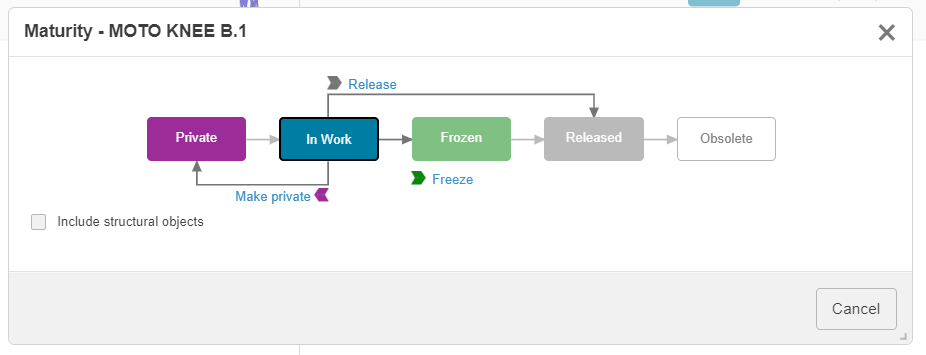
- Processing: this is the default state – you can modify and save the object as you wish.
- Frozen : this is a temporary state – the object is read-only. You can always return to the “In progress” state.
Used when the part is in waiting for validation. This prevents your colleagues from accidentally modifying the file, should it be used in other assemblies.
- Distributed : this is a definitive state. It is not possible to return to the “In process” or “Frozen” status. The file is read-only forever.
Usually, you launch an object to indicate that it is going into production, and create the associated STEP, PDF or DXF files…
The usual process is as follows:

2. Modify maturity status across the platform
Go to the Bookmark Editor application and click on the maturity to modify it.
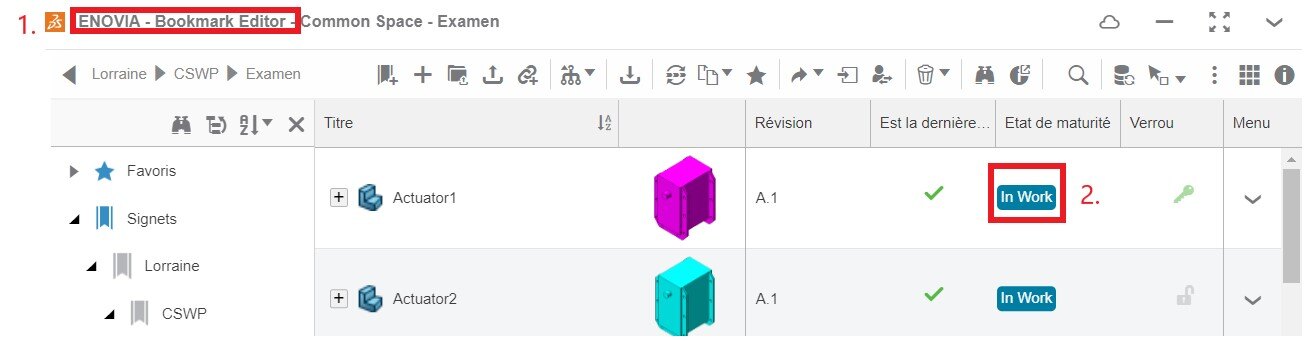
Change to“Frozen” if you want to create a revision, but it has not yet been published.
Change to“Distributed” if your file will be manufactured and converted (STEP, PDF…).
Conclusion
Whether you’re working alone or in a large team, maturities help you restrict modifications, create revisions, and generally streamline collaboration.
It’s integrated into 3DEXPERIENCE and sets the new standard for design.
You’re now ready to create revisions, whether for SOLIDWORKS or CATIA.
Need help?
We look forward to hearing from you! Contact us at support@xdinnovation.eu




