
Problem:
When you launch SOLIDWORKS, the error message“License not granted or missing” and “Express client/server error” appears and you cannot continue.
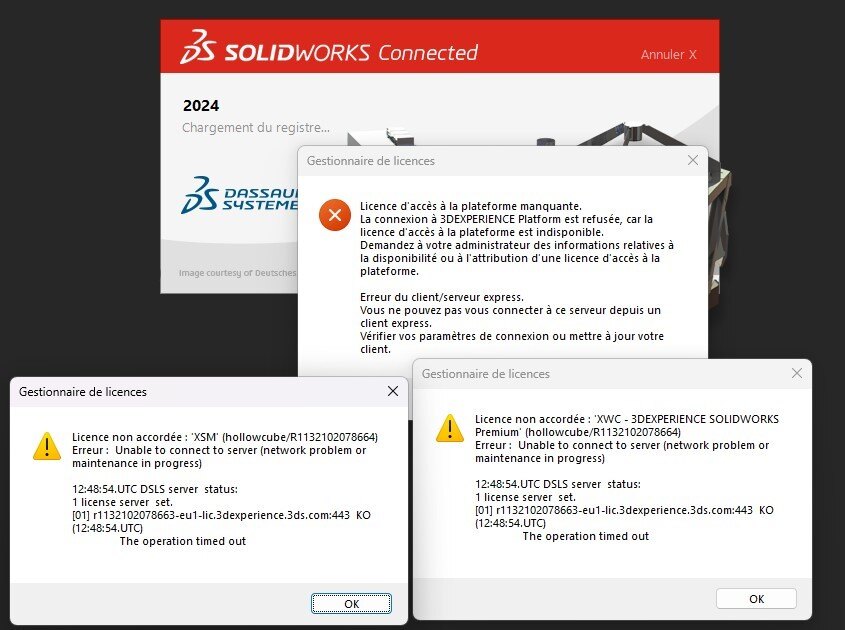
Causes and resolutions :
1. Crash
Following a crash, SOLIDWORKS closes abruptly and may corrupt the link between the license and 3DEXPERIENCE. This explains why the message appears when the software is reopened.
Resolution :
a. Restart your computer
b. If this is not enough, close SOLIDWORKS in the Task Manager.
A crash is not a harmless event, especially if it occurs regularly. Use this article to optimize your performance!
2. Connection to another computer
When you connect to one machine, then disconnect to work on another, the error message may appear. This is due to a latency between the connection of one workstation to another.
Resolution:
Wait 15-30 min, then reopen SOLIDWORKS.
3. License renewal
If your license renewal has not been properly anticipated, this message appears.
Resolution :
See this article and ask your administrator (if not you) to update the license.
4. Time zone problem
If you open SOLIDWORKS using a connection to a remote computer, make sure that the remote computer’s time zone matches your own.
Report the problem!
a. Is the problem solved? Let us know, so we can prevent it from happening again!
b. Still not working? Contact us too!
Contact: support@xdinnovation.eu




